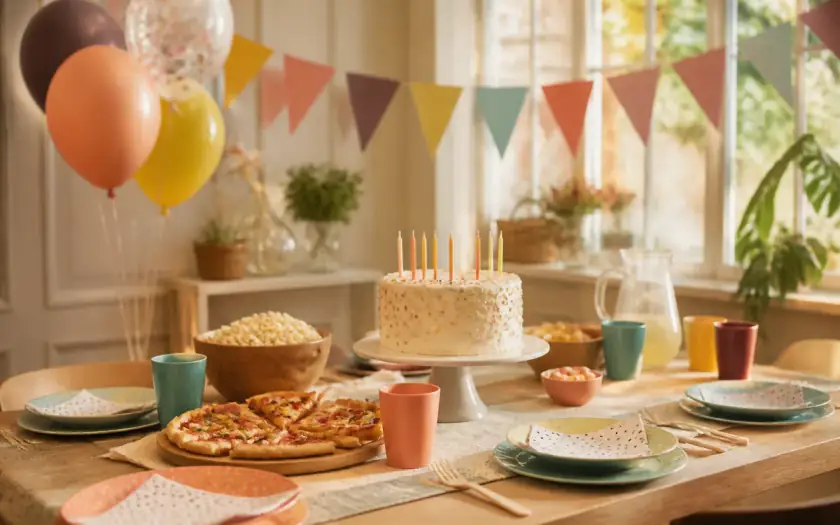
Plan party food, drinks, ice and supplies from guest numbers and event length, with the calculator’s editable defaults and a worked example.
Start from guests and the food’s role
Snacks alongside a meal need fewer pieces than food that replaces a meal. The calculator’s defaults — 5 finger-food pieces per adult and 3 per child — are a starting point to edit, not a rule.
Worked example
Ten adults and four children at the defaults need 62 pieces; a 10% allowance makes 68.2, or 4 packs of 20. For a 4-hour event, drinks at 1.2 servings per adult and 1 per child per hour come to about 70 servings of 250 ml, 17.6 L, or 12 bottles of 1.5 L.
Ice, seats and supplies
The same guest count drives ice (0.5 kg per guest by default gives 7.7 kg with the allowance), seating (14 seats at tables of 6 means 3 tables) and plates (2 per person, 31 with the allowance).
Plan storage and service
Refrigeration, hot holding and serving space limit what can be handled safely. Choose quantities you can keep at safe temperatures for the length of the event.
Practical checklist
Label common allergens clearly.
Keep a small shelf-stable reserve.
Count helpers who will eat as guests.
Babushka Picks
A short list for the next step
Start with the essential item, add the useful option when it improves the job, and treat the final choice as optional.
Use the values and units in the worked example below; change the assumptions for your own project.
Pre-filled values: Snacks
Input
Value
Adults
10
Children
4
Pieces per adult for the whole event
5 pieces
Pieces per child for the whole event
3 pieces
Extra allowance
10 %
Pack size
20 pieces
Calculated result
Result
Value
Required quantity
68.2 pieces
Packs to buy
4
Purchase quantity
80 pieces
Left over
11.8 pieces
Questions and answers
How does Party Food Planning Guide work?
Plan savoury pieces for the whole event. Increase portions for longer events or when snacks replace a meal. Portions are editable examples. A meal replacement needs more pieces than a short drinks reception; plan the menu rather than applying one universal hourly rule. Count each dish separately so you do not buy a full meal portion of every item.
What does the worked example show?
Inputs: Adults: 10; Children: 4; Pieces per adult for the whole event: 5 pieces; Pieces per child for the whole event: 3 pieces; Extra allowance: 10 %; Pack size: 20 pieces. Result: Required quantity: 68.2 pieces; Packs to buy: 4; Purchase quantity: 80 pieces; Left over: 11.8 pieces.
What should I check before using the result?
Example from an existing calculator
Party Food Quantity Planner | Babushka Market. This worked example demonstrates the calculation in the linked tool. Its displayed assumptions apply to that example; use the guidance above to decide which measurements, product specifications or quantities belong to your own task.
Worked example
With Adults: 10; Children: 4; Pieces per adult for the whole event: 5 pieces; Pieces per child for the whole event: 3 pieces; Extra allowance: 10 %; Pack size: 20 pieces, the calculator returns Required quantity: 68.2 pieces.
Inputs
Inputs
Changed input
Adults
10
Children
4
Pieces per adult for the whole event
5 pieces
Pieces per child for the whole event
3 pieces
Extra allowance
10 %
Pack size
20 pieces
Calculated result
Calculated result
Changed input
Required quantity
68.2 pieces
Packs to buy
4
Purchase quantity
80 pieces
Left over
11.8 pieces
Method and assumptions
Portions are editable examples.
Common-value reference
The reference cases change only Adults. The remaining inputs stay at the displayed values. These are worked scenarios, not universal rates, dimensions, product specifications or current shop prices.
Common-value reference
Adults
Required quantity
Adults: 10
Required quantity: 68.2 pieces
Adults: 4
Required quantity: 35.2 pieces
Adults: 8
Required quantity: 57.2 pieces
Adults: 12
Required quantity: 79.2 pieces
Adults: 20
Required quantity: 123.2 pieces
Questions and answers
How is this example calculated?
Portions are editable examples. In the displayed example, Adults: 10; Children: 4; Pieces per adult for the whole event: 5 pieces; Pieces per child for the whole event: 3 pieces; Extra allowance: 10 %; Pack size: 20 pieces. The calculated outputs are Required quantity: 68.2 pieces; Packs to buy: 4; Purchase quantity: 80 pieces; Left over: 11.8 pieces. Keep the labels and units with these numbers: they describe this particular combination of inputs, not a result that can be reused after the measurements or assumptions change.
What changes when I edit Adults?
The table isolates that input while keeping the other displayed settings fixed. For Adults: 4, the result is Required quantity: 35.2 pieces; for Adults: 20, it is Required quantity: 123.2 pieces. Those values come from the same calculator used on this page. They show the effect of changing the input, rather than prescribing which input is right for your own task.
How should I use the different result figures?
Read each named quantity separately: Required quantity: 68.2 pieces; Packs to buy: 4; Purchase quantity: 80 pieces; Left over: 11.8 pieces. A value with a different label or unit answers a different part of the calculation. Check the measurements and assumptions before using any figure. The reference cases explain the arithmetic under their stated conditions; they do not verify a product label, a recipe or the conditions of a particular project.